
OAuth 2.1 · OpenID Connect · MCP
One server for your users, your APIs and your AI agents.
FoxAuth handles sign-in, enterprise identity providers, directory sync, banking-grade token security and authorization for AI agents. Behind these features are 30 standards that take a team years to build, and all of them are already built and tested. Start free on FoxAuth Cloud with up to 1,000,000 monthly active users per project, or run the server yourself.
30 specifications1,000,000 MAU freeBun + Elysia
curl -O https://raw.githubusercontent.com/RedFox-Soft/OAuth-server.ts/main/docker-compose.yml
docker compose up
# open http://localhost:3000/admin
What those two commands give you
- A database started and provisioned, with indexes and a signing key
- Admin console at /admin, with first-run setup for the super administrator
- Discovery at /.well-known/openid-configuration, reflecting the flags you set
- No account with us, no API key, no phone call
If you already use something else, we keep dated, sourced comparisons with Auth0, authentik, Keycloak, Ory Hydra and Zitadel, each listing the pages we read and the date we read them.
The console
Everything an operator needs, without a second product.
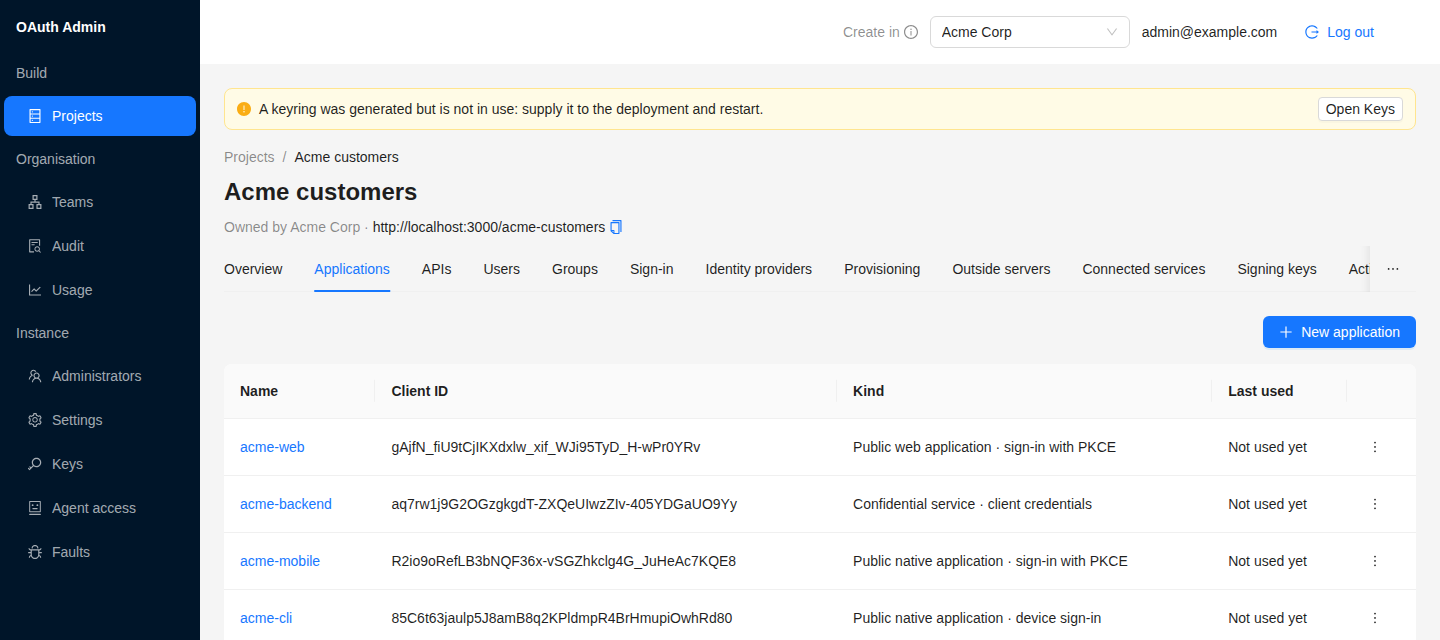
Projects with their applications and APIs, end-users, upstream providers, SCIM connections, settings, SMTP, signing keys, monthly active users and an append-only audit trail, all in one console. You sign into it through the server's own OpenID Connect flow, or through your organisation's identity provider. A change that could lock people out says whom it affects before it applies. An AI agent uses the same API over MCP.
Who runs it
Three teams, one server.
The same binary, the same admin API. What changes, for the most part, is which flags you set.
For TypeScript teams
Bun and Elysia, one command to run, and 31 named seams you replace with your own function instead of forking.
- Runs on Bun; the HTTP layer is Elysia
- PostgreSQL or MongoDB in production, in-memory for tests
- 31 override seams, resolved at call time
See all features
For AI-agent builders
Protect your own MCP server with FoxAuth, and let an agent administer the instance through the console’s own code path. There is no separate privileged API to keep in step.
- Declare your MCP server; get audience-bound tokens (RFC 8707)
- Client ID Metadata Documents, so an agent host needs no setup
- 143 MCP tools for administration, off until you set mcp.enabled
See all features
For regulated industries
The banking-grade profiles are all implemented today. Turn on the flag your regulator asks for.
- FAPI, IPSIE SL1, DPoP, PAR, mTLS, CIBA, RAR, JARM
- Append-only admin audit trail
- Per-identity brute-force throttle
See all features
Quick start
A token in five minutes.
You need no account with us and no API key. After three short pages, you should have a token in your terminal.
Run the server
Docker Compose starts the database, provisions the schema and seeds the admin console. One file per datastore; pick either.
Register a client
Create a project and its first OAuth client in the console, with exact redirect URIs.
Get a token
Walk the Authorization Code flow with PKCE and read the claims out of the ID token.
Standards
30 specifications, implemented.
Every entry below is code in the repository, with tests. Each links to the spec it implements. The endpoint reference names the flag that governs each one.
- OAuth 2.1
- RFC 6749
- RFC 7636
- RFC 7519
- RFC 7517
- RFC 9068
- OIDC Core 1.0
- OIDC Discovery 1.0
- OIDC RP-Initiated Logout 1.0
- OIDC Back-Channel Logout 1.0
- RFC 8414
- RFC 9207
- RFC 8707
- RFC 7009
- RFC 7662
- RFC 9701
- RFC 9126
- RFC 9449
- RFC 7591
- RFC 7592
- RFC 8628
- RFC 8705
- RFC 9396
- RFC 9728
- RFC 7643
- RFC 7644
- CIBA
- JARM
- RFC 6238
- Client ID Metadata Document
An OAuth server for MCP
Protect your MCP server, and let an agent operate this one.
Declare your own MCP server as a protected resource of a project and this server mints tokens whose audience is exactly that resource. Declaring it needs no code on this server and no restart. An agent host discovers it, signs your users in, and comes back with a token your MCP server verifies against the published keys without asking anything. A client_id that is an HTTPS URL is accepted as a client identity document, so a host with nothing to configure still connects.
Turn on mcp.enabled and the management API is served to an AI agent at POST /mcp as an OAuth 2.1 protected resource. Each of the 143 tools rebuilds the request the console would have sent and runs the console's own permission checks, validation and audit write, so no privileged back door can drift away from the console.
Destructive and instance-wide operations need two calls: the first returns a confirmation token, the second carries it. Administration over MCP is off by default.
agent  → settings_update { "deviceFlow.enabled": false }

server ← Nothing has been changed. Change server settings. The merged
         configuration is validated first …

         Target: settings_update
         To proceed, call settings_update again with
         confirmationToken="<token from the first call>".
         It is valid once, until 2026-09-03T14:12:04.000Z.

agent  → settings_update { "deviceFlow.enabled": false,
                           "confirmationToken": "<token from the first call>" }

server ← { "appliedKeys": ["deviceFlow.enabled"],
           "pendingRestartKeys": [], … }

         Audit: actor agent:ops-bot, action settings.update.
Start
Start free, today.
Create a free account on FoxAuth Cloud, with up to 1,000,000 monthly active users per project, or run the server yourself this afternoon. Paid cloud plans are in development.